Monday, December 7, 2015

Blended Learning in Elementary Education

Several years ago I began blending my instruction in a second grade classroom.  Throughout this journey I felt isolated and alone as I planned my instruction, but I quickly realized that I had tons of support from classroom teachers around the world who were also blending their instruction.  I began taking advantage of Twitter where I was able to further my understanding of blended learning and found the support I needed to move forward in my instruction.
Image Credit:  Ed Tech


This course opened my eyes to the many myths about blended learning.  I think I would have found these to be true several years ago, so I can see where people are coming from.  However, I know there are effective resources out there that make blended learning just as fabulous for an instructor as his/her students.
I feel that through my instruction over the past few years I have thought about these myths, but was able to quickly dismiss them because of the success I had with my personal students.

Image Credit:  Emersive Tech

This year I took on a new role as our school’s Instructional Coach.  Our school has also moved to a blended learning focus.  I am hoping to learn the best instructional strategies for teaching elementary students in a blended learning environment as well as ways to squash some of these myths with our staff.  Throughout this course I have completed research that supports implementing blended learning within the elementary classroom.  I am able to take this information back to our professional learning communities as I support teachers within my school to continue with their implementation of blended learning.  

I love this infographic from Digital Learning Now.

Muths-about-Online-Learning-Infographic
Find more education infographics on e-Learning Infographics

Sunday, June 28, 2015

Analysis of Literature Review

About three years ago I began providing blended learning opportunities for students in both 1st and 2nd grade.  I began researching best practices for implementing online tools as part of my daily instruction.  I have since become more aware of TPACK and the SAMR model and continue to think through those frameworks as I design online instruction.  As I’ve conducted research around a variety of instructional design models I’ve realized this is a piece I need to be more cognitively aware of as I design online instruction for my students.
I have been able to identify trends, implications, as well as some recommendations based on notes provided by our class after reviewing a variety of literature pieces around instructional design.
Trends:
As I looked through the research for popular trends in the articles read by students within our class, I found that creativity and engagement continue to be trends in online instructional design just as it is in face-to-face instruction.  Good teaching is still good teaching even when applied to online instruction.  Instructors need to continue modeling, providing time for practice, assessing, and making changes in instruction based on these assessments.  These instructors also need to be creative in their instructional design in order to keep students highly engaged.

Image Credit: worldteacher-andrea.blogspot.com
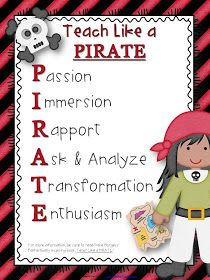
Earlier this year I attended a conference where Dave Burgess presented his idea of “teach like a pirate”.  His philosophy has roots in being creative and continuously engaging students.  As online instructors use the mentioned instructional design frameworks to design their instruction with a mix of “teach like a pirate” I believe we would have high student success.  The research supports the success of using instructional design frameworks that encourage creativity and highly engaging activities.  Check out Dave Burgess’ website here

Image Credit:  3rdgradethoughts.com
Implications and Recommendations:
According to the research, there is still little research around the use of blended learning opportunities for higher education.  The research also implies that effectively using any of the instructional design frameworks such as the ADDIE model, Universal Design for Learning, Merrill’s First Principles support student success.  These models can support instructors in designing effective online instruction for learners in higher education.  
As we move forward with online learning in higher education instructors need to make changes to their instructional designs by taking of advantage of an instructional design model that best fits their needs as they redesign their instruction.  Even though good teaching is good teaching whether face-to-face or online, the instructional strategies look different and many times these instructors struggle keeping online students highly engaged.
As an instructor that provides online learning opportunities for my students, I look forward to using a mixture of these models as I redesign instruction for my students.  I also believe participating in online classes as a student with an amazing professor has been a fantastic model for strong online instruction!

Sunday, June 7, 2015

ADDIE, UDL or BOTH!

As I’ve engaged with multiple instructional design models I’ve been able to relate to all of them in one way or another as I think about my personal instructional methods.  The Universal Design for Learning framework and the ADDIE framework are both very new to me, but I feel that I can relate to these two models the most out of all the instructional designs we are studying.

The ADDIE framework isn’t a linear process, so this gives instructors the flexibility to work through each part of the framework that best fits their needs.  I fully support each phase of this framework, however, I feel that this framework is missing some very important pieces to effective instruction.  This framework doesn’t mention the importance of engagement.  An instructor could spend a tremendous amount of time in these five phases and the instruction would mean nothing if learners are not engaged in their learning.  ADDIE needs to have an extra E. . . ADDIEE!! I also believe this framework doesn’t specifically address the need for collaboration and communication which is such an important skill to learn as we prepare students for college and/or a career.  I realize this could be included in the design of the course, but I like how the Universal Design for Learning Guidelines include engagement, collaboration, and communication as part of the framework.  


I also love the Universal Design for Learning Guidelines.  I believe this framework would be a great way for beginning instructors to ensure they are providing strong, effective instruction.  I don’t believe this framework encourages the reflective piece that is found in the ADDIE framework.  It is so important to think through why you are doing what you’re doing.  The ADDIE framework encourages analyzing and evaluating course instruction.  The UDL guidelines address the need for reflective practices for the student, but not necessarily the instructor.  I also like how the ADDIE framework has the instructor think through the goals and learning objectives, and these important aspects of effective instruction are not mentioned in the UDL guidelines.  

For me, I feel that I follow the ADDIE framework as I think through and design instruction for my students.  I feel that I follow the UDL design more closely when I am actually designing and developing course material and activities.  However, both of these instructional frameworks are missing the idea of starting with the end in mind and designing acceptable evidence before starting instruction! :)  We need the Understanding by Design framework mixed in here as well!  Looks like we need a new framework with a whole lot of letters!


Saturday, June 6, 2015

Universal Design for Learning

This is the first I have learned of the three UDL principles and the guidelines and I can definitely see how this framework would lend itself to great instruction.  I feel that I follow some of the guidelines on a regular basis, and other guidelines that need to be improved in my daily instruction.

Guidelines
My Instruction
Multiple Means of Representation
Teaching elementary school really lends itself to multiple means of representation.  We are always looking for ways to reach and teach every child.  We use songs, manipulatives, videos, games, etc. in order to teach a variety of skills.  

We also spend lots of time building background knowledge in reading and our math curriculum is set up in a way that it builds off prior knowledge.  

I feel that I can grow in the area of addressing patterns, critical features, big ideas, and relationships.  Sometimes I get so focused on what I’m trying to teach that I forget to think of my instruction in a broader context.  

Multiple Means of Action and Expression
As a blended learning classroom, I have been able to provide instructional materials in a variety of ways.  I usually model activities, work through activities with them, and then provide them opportunities to show their understanding on their own or in a collaborative group.  Through the use of data notebooks I have been able to guide appropriate goal setting and manage progress monitoring.
Multiple Means of Engagement
Through the use of gamification I have been able to provide student choice and eliminate threats and distractions for students by allowing them to work at their own pace.  Gamification has also allowed my students to work toward mastery of standards instead of just getting a grade.  They were able to resubmit work samples until they were able to show mastery of the skill.  Gamification gave my students the opportunity to be responsible for their own learning.  I need to give my students more opportunities to reflect and self-assess.


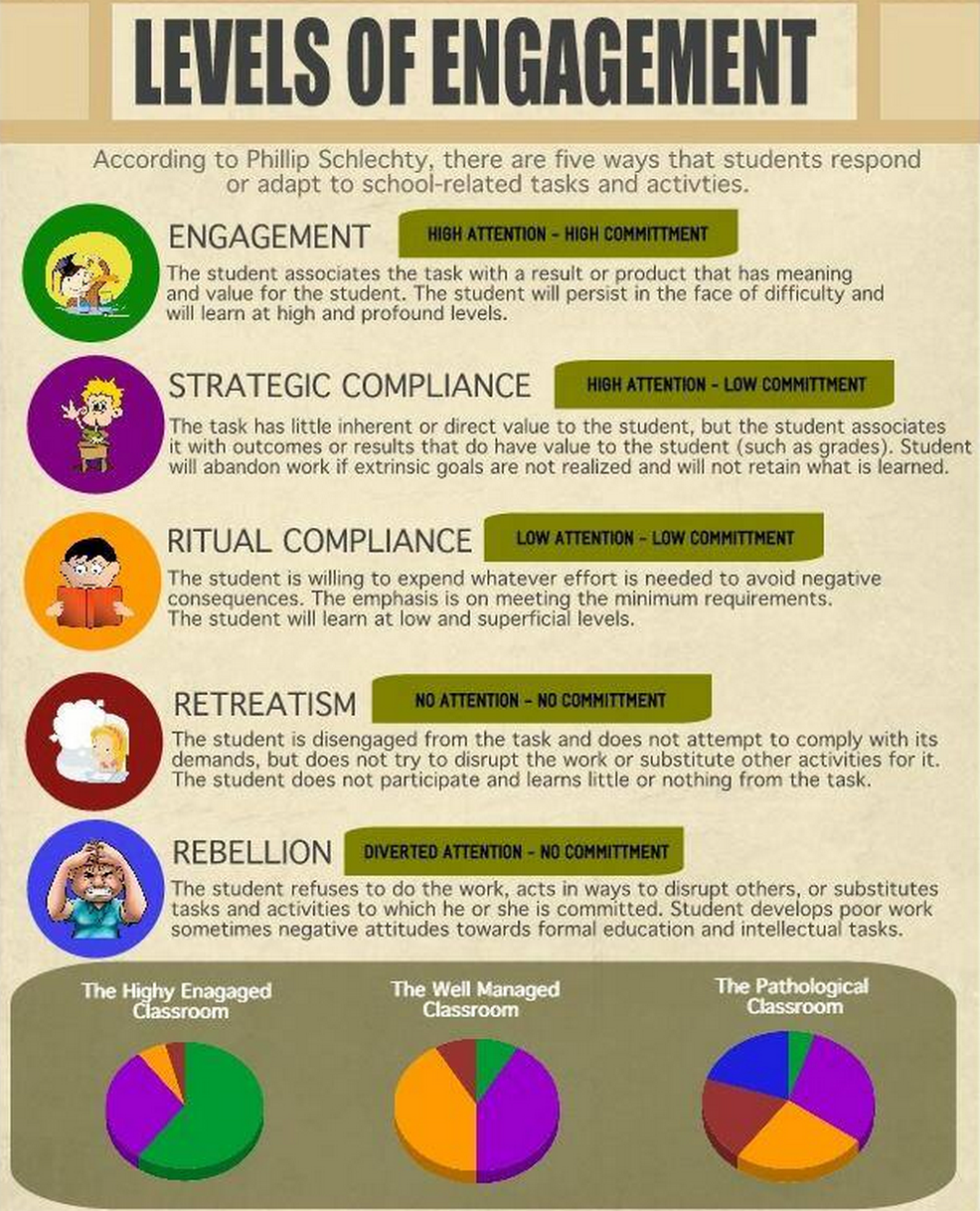
I strongly believe in the power of engagement!  I had a friend who recently shared a blog post with me about the levels of engagement.  Check it out here. When I first started teaching I had very well behaved students. I realize now that I was running a Well Managed Classroom (see below). I continue to strive for the Highly Engaged Classroom. We all know that our students come to us on different levels and with different interests, so this is a challenge. . . but a challenge I enjoy thinking through every week at planning!

Sunday, March 29, 2015

Online Learning in an Elementary Classroom

This year my classroom is one of two blended learning pilots in my district.  This opportunity has definitely opened my eyes to the idea of providing online learning for young learners.  I am excited to share with you my journey with blended learning in a first grade classroom!

At the beginning of the year I had the awesome opportunity to collaborate and plan with Dr. Linton and Miss Mrazez (the other blended learning teacher).  We thought through the implementation of blended learning for this school year as well as what a day-in-the -life of blended learning would look like in a first grade classroom.  I was able to take all this information and make it my own as I began to provide blended learning opportunities for my students.

Last year, I had the opportunity through our region to participate in their Digital Learning Academy where I attended a session by Lucas Gillespie (@lucasgillespie) in gaming.  This session got me excited about gamification and new ways to engage my young kiddos.  He introduced me to the 3D GameLab which is a learning managment system used to provide gamification opportunities for students.

I hoped to jump right in to the 3D GameLab (3DGL) with my students, but after collaborating with Dr. Linton I decided to provide these gamification opportunities on paper and through the use of Nearpod before intoducing the 3DGL to my students.

I wanted to ensure my students had choice and that I was meeting the needs of my students.  At the beginning of each math unit my students would take a pre-test.  This gave my students the opportunity to earn experience points for those skills and concepts already mastered.  I would then pass out a handout that listed possible math quests.  Students would choose quests they would like to skip by using experience points as well as the order they would complete these quests.  The handout would give them a Nearpod code.  They would put the code in Nearpod and work through the presentation.  At the beginning of the year some of these presentations would include a video of me giving directions (all students could not read), a video of me teaching specific skills and concepts (used to flip my classroom and/or for review), and a way for students to show their understanding.  Others would be math journal opportunities with choice, skill practice, and hands-on opportunities.  Students were also able to earn badges for quests completed for hard working behaviors (time on task, completing two quests in a day, etc.).  

Here is an example of a handout from the beginning of the year.

Unfortunately, these Nearpod codes have expired. Sorry!


As my students became comfortable choosing their quests and working through these presentations, I introduced the 3D GameLab.  They now get to their quests through the 3D GameLab.  They are still able to use experience points to skip quests, move through the quests at their own pace, earn badges, and level up to more challenging opportunities.  My students love the feel of the 3D GameLab and are ecstatic when they earn new badges!  

Here is an example math journal quest from the beginning of the year.


I also provide online learning opportunities in Language Arts.  Here is an example from earlier this year.


Earlier this year I presented a session titled Gamification in an Elementary Classroom.  Feel free to check out more resources from this presentation.

I have learned so much this year about blended learning, but I continue to learn something new everyday!  Next year my school will be a blended learning magnet school!  It will be awesome to have team members to collaborate and plan with as we all provide online learning opportunities for our students.


Saturday, January 31, 2015

Methods of Asynchronous Facilitation


I teach first grade in a brick-and-mortar school, but for the past three years I have provided blended learning opportunities for my students.  Through these experiences I have played around with asynchronous opportunities.  Two years ago I taught second grade and my students were active bloggers.  They would blog about our character kid, our science investigations, and about the books we were reading in class.  I began facilitating asynchronous discussions through our learning management system about their blog posts.  It was a disaster!  My students did a great job answering my questions, but they never interacted with each other.  The few students who attempted to interact with their classmates only made comments like, “Hi” and “I like your post”.  I had a very difficult time getting them to reflect on their own posts and/or think critically about posts made by their classmates.  We were able to have fabulous conversations about these posts when we were face-to-face, but I was not able to get these same responses through an asynchronous discussion.  It’s not that my second graders (or even my first graders) are not capable of handling asynchronous discussions, it was the method of instruction (or lack thereof) by me.  


Online instruction can be difficult, but with the use of synchronous and asynchronous opportunities online instructors are able to provide effective instruction if used appropriately.


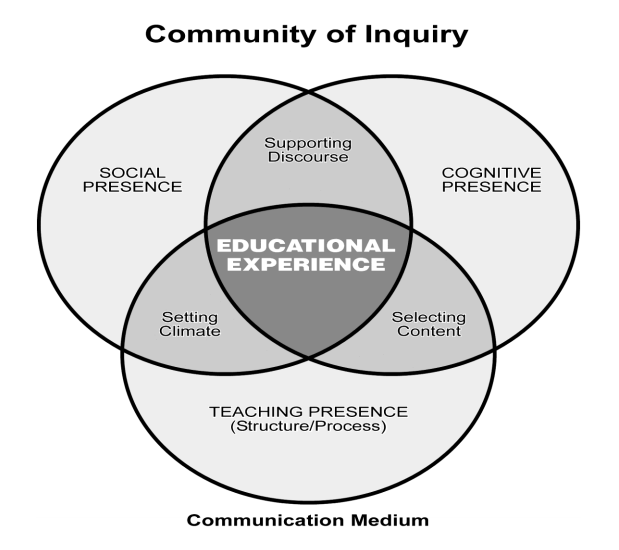
Asynchronous instruction allows students to communicate with each other and provides the instructor the opportunity to facilitate the discussions.  In order to provide successful asynchronous instruction there are several things to keep in mind.  Instructors need to keep in mind the social, cognitive, and teaching aspects of the process.  The diagram below allows us to see how these three aspects work together to create effective online experiences for our learners.


venn diagram- blog post.PNG


Students may find it difficult to develop relationships online.  They not only struggle seeing others as real people, they also struggle communicating their own personality.  It’s important for instructors to model social presence and set the stage for his/her hopes for asynchronous discussions.  Another helpful strategy in building social presence is requiring asynchronous discussions and even grading these discussions.  Students are more likely be actively involved in discussions if it’s for a grade.


Cognitive presence is also important in facilitating successful asynchronous discussions.  Instructors need to select prompts that require learners to solve a problem or debate with their colleagues in order to engage students are require the use of critical thinking skills  As students are building relationships among their colleagues through discussions, it is imperative that these discussions push them to reflect and better understand the concepts at hand.  Instructors play an important role in facilitating these discussions by asking appropriate questions to further learning and/or challenge the standing of the post.


Teaching presence is the last piece needed to create effective asynchronous opportunities for your students.  Even though we want our learners to learn from each other, the instructor’s presence needs to be felt throughout the discussions.  Not only does the instructor need to provide prompt feedback, he/she also needs to provide meaningful responses throughout asynchronous discussions.  Another effective strategy is to give students the opportunity to facilitate discussions. You may find that some students are more comfortable responding to someone one equal footing rather than the professor.

Check out the video below! Not only does it support using asynchronous discussions with your students, they also provide some strategy in using these discussion boards.


Now I feel more prepared to facilitate asynchronous discussions with my first graders!


Through my research on asynchronous facilitation, I came across this post which is a great resource for effective tools that can be used for synchronous and asynchronous opportunities.


Check out the article below for more information on asynchronous discussions!


DeNoyelles, Aimee, Janet M. Zydney, and Baiyun Chen. "Strategies for Creating a Community of 
Inquiry through Online Asynchronous Discussions." MERLOT Journal of Online Learning 
and Teaching 10.1 (2014): 153-65. Web.


Garrison, D. Randy. "THE ROLE OF REFLECTIVE INQUIRY, SELF-DIRECTION AND 
METACOGNITION." COGNITIVE PRESENCE FOR EFFECTIVE ASYNCHRONOUS 
ONLINE LEARNING: THE ROLE OF REFLECTIVE INQUIRY, SELF-DIRECTION AND 
METACOGNITION (n.d.): n. pag. Web.

Sunday, December 7, 2014

My Digital Toolbox

For the past few years I have been incorporating more and more technology within my classroom.  I have attended several state technology conferences as well as local technology trainings.  I was excited to start a digital toolbox because I knew I would have LOTS of tools to add.  I didn't add tools to my toolbox throughout the semester, but I would email myself tools that I wanted to try out and then once I was able to check out the tools and decide if it's a tool that I would actually use as a teacher I made the decision as to whether or not I wanted to add the tool to my toolbox.

Once I started reflecting on my toolbox I was surprised by what I saw!  It was interesting to me that most of the items placed in my toolbox were tools I would use to create learning objects.  Even though these learning objects are interactive for my students, I have very few items in my toolbox that require my students to create using a digital tool.  I'm not sure I would have realized this if I wasn't forced to reflect on the tools that I placed in my toolbox.  I considered the SAMR model and ISTE standards as I was rating my tools.  The tools in my toolbox definitely give me the opportunity to redefine tasks for my students, however, I need to consider the ISTE Standards as I continue to add to my toolbox.  I need to continue my search for digital tools that allow my students to create and collaborate with others.

I also realized what was important to me and my teaching as I reflected on the tools in my toolbox. My top priorities were always user friendly (for me and my students) as well as the ability to deliver content.  Some of the tools I use on a daily basis are not free, so I need to be thinking about the sustainability of these tools for the future.

I chose Pinterest to house my Digital Toolbox because it was easier to put my ratings, but the more I added tools to my toolbox I was glad I chose Pinterest because of the ease of accessing my toolbox.  I now pull up my Digital Toolbox when we are planning as a grade level team and as I plan out my quests.  I use Pinterest for educational purposes on a daily basis, so I know I will be able to easily add more tools to my toolbox.

For those interested in starting a Digital Toolbox here is a great article and a LiveBinder with helpful tools to help you get started!


Saturday, November 22, 2014

Digital Me

Throughout my career I have been asked to keep samples of my student's work (portfolio) to show parents at student-led conferences or to prove they have mastered the skills taught throughout the year. This portfolio was always full of written tests and worksheets. Parents would look through the portfolio and only see a score, in my opinion. They would say, "Good job, looks like you have all A's." Other parents saying, "Hmmm. . . what happened? It looks like you made a bad grade." I found this heartbreaking. . . for both students. Yes, I know it is wonderful that the first student was able to make all A's, but the parents missed the point. Did you see the strategies your child used? Did you see he/she created their own word problem on the back of the test? Did you know she can teach how to solve all those problems to her peers? the answer was, "No." In the case of the other student, yes, it is a concern that this child is not mastering all the skills, but the parents are missing all the growth this child has made!! Did you see that your child can now use a picture to represent their word problem? Did you see the only reason the problem was incorrect was because they miscounted the circles they drew? Did you see that your child can explain how to use EVERY single strategy that I taught, but makes simple mistakes when they use the strategy? The answer was still, "No."
For the past three years I have been lucky enough to be 1:1 with iPads!  Even though I haven’t used digital portfolios per say, my kids started providing evidence of their learning through the use of digital tools.  This past year, my students were able to share their KidBlog with their parents.  Their blog showed their learning throughout the year in a variety of ways.  We had science notebooking with pictures and videos of our science investigations, we had videos of students explaining how to solve problems in math, as well as posts showing their growth in writing.  These posts were very sporadic throughout the year, so they were more just posts on their blog than an e-portfolio, but their parents were blown away by what their child had learned throughout the year.  I didn’t hear a single comment about grades or about the lack of knowledge they were seeing in their child’s work.  Instead, I heard comments like, “Wow!!  That was awesome!  I can’t believe you can create your own word problems!”  or “I don’t even understand what you did to solve that problem, but that was great!”  Haha!!
This year my goal was to have an e-Portfolio for every student. . . this goal has changed!  This year I changed grade levels, so my focus has been on using best instructional practices and figuring out what I can expect from a first grader when it comes to technology.  Even though it doesn’t look like we will have a digital portfolio for all subjects, we have finally started a digital portfolio in math!  Yay!!
We are using the 3D GameLab for part of our math instruction.  My students work through a variety of quests at their own pace.  These quests offer review videos, differentiated math prompts, as well as opportunities to code or play math games.  Each quest requires the student to submit some type of artifact to show their understanding.  So far we have used pictures, videos, and text.  These artifacts may be a snapshot of their work on a digital “worksheet”, a picture of their work as they use a specific app to show understanding (base ten blocks), or a video as they explain they solved a problem, as they created a problem, or maybe they are teaching how to solve the problem.  As my students submit quests, I try to give immediate feedback.  Sometimes I call them over and verbally discuss what they turned in and other times I type in a response and send the quest back to them for them to review at their seats.  I would love to provide video feedback, but I’m usually checking quests as I work with a small group, so that isn’t feasible at this time.  
Even though I LOVE the 3D GameLab, I have definitely come across some challenges.  We have been working in the 3D GameLab for over three weeks, and I still have students who will ask me EVERY single day, “What do I do now”?  Ugh!!  I now have a few “go to” students who will help with these problems, but it’s still an issue I deal with every day.  Another challenge is getting quality videos.  My students usually video each other as they are explaining how to solve problems for their math journal.  Sometimes these videos aren’t close enough to the journal so I can’t see the work or they may have their hand over the microphone so I can’t hear what the student is saying.  I applied for and received an innovative grant from my school system for a Pro Account in Educreations, so once I receive that account my students will be able to record multiple sessions and upload the link to the 3D GameLab, so hopefully that will help with math journal recordings.
We still have a long way to go, but I’m so proud of my students!  Hopefully, our “Digital Me” portfolios will be a huge success at student-led conferences at the end of the school year!!
Here is a student explaining how to solve a word problem that was posted as a math journal option.

Here is another student sharing the word problem he created and showing how he solved the problem.

Below is a snapshot of a 3D GameLab portfolio. My students can click on any of the quests and share the work that was submitted as well as the feedback I provided.


**No worries, I have permission from parents to post these specific videos on my blog. :)


Sunday, November 16, 2014

Online and In-the-Moment


Research supports that there are many ways to build an online community.  In the article, Contribution of Learner–Instructor Interaction to Sense of Community in Graduate Online Education, they mentioned a variety of contributing factors to building an online community.  Their research showed that having a professor who models the types of interactions wanted for their online class is the most successful for building a sense of community.  I couldn't agree more.  As a student in an online learning community, I feel my professor set the stage from the very beginning of the course through our synchronous classes, her announcements, and even with her quick feedback.  Not only did this get me excited about the content I was learning, but it also put me at ease when it came to participating in class.  

As I read the article, The Effects of Instructional Immediacy Behaviors in Online Learning Environments,  I realized that my experience in online learning has felt more personalized than face-to-face courses.  Through our synchronous meetings, I am able to talk directly to our professor and/or colleagues in this course.  We have participated in more conversations (started by our professor) than I ever did in face-to-face courses.  I only remember 2 or 3 courses in my undergraduate and graduate courses that I actually spoke to my professor.  My experience is aligned with the results found in this article.  I have a professor who provides a high-immediacy course and therefore I feel the social presence of my professor and colleagues.

As I continued to research instructional immediacy, I found the seven principles in the article, Instructional Immediacy and the Seven Principles:  Strategies for Facilitating Online Courses, to be true to my experience as a student in an online learning environment.

My experience in an online learning environment has been very different from my experience in face-to-face courses.  I have always been very quiet and shy, especially as I completed my undergraduate courses.  I cannot think of a single time I spoke to my professor as I completed these courses.  I came out of my shell a little as I completed courses in my graduate program, but mainly to clarify assignments.  I have felt very comfortable speaking up during our synchronous class of my online learning course.  When I do speak during this course, I feel comfortable.  I believe this is because of responses by my professor as well as comments by colleagues in the chat bar which is encouraged by our professor.  I feel that our professor set the stage for this comfortable environment through our Meet and Greet videos as well as her continuous feedback and encouragement to communicate with each other.

For me, as a teacher providing a mixture of face-to-face and online learning, I believe I need to continue working on instructional immediacy when providing the online portion of our learning environment.  I love the video below!! It is very relevant to the type of instructional immediacy I could provide for my students. I love the idea of providing more meaningful videos!  I could record myself at home with a problem and use a math strategy to help solve the problem.  For example:  I could video myself as I was helping the girls count out their Halloween candy.  We could start by just counting 1, 2, 3, etc.  Then we could realize it would be so much easier to put the candy in groups of ten and then count. What a great way to make my online videos more meaningful to my students!


Even though they are learning online, I can still make it in-the-moment!! :)


So. . . I decided to video "in-the-moment"!!  This is a video of me trying to explain a real-world packaging problem.  My students need to be able to count by 10's and understand how many boxes or containers would be needed for a given number of objects.  Check out my first attempt!


I'm using this video for my math quests this week!! Hope they like it! :)

Resources:
     Shackelford, Jo L., and Marge Maxwell. "Contribution of Learner-Instructor Interaction to Sense of Community in Graduate Online Education."MERLOT Journal of Online Learning and Teaching 8.4 (2012): 248-60. Print.
     Shutt, Maria, Brock S. Allen, and Mark A. Laumakis. "Effects of Instructor Immediacy Behaviors in Online Learning Environ0ments." The Quarterly Review of Distance Education 10.2 (2009): 135-48. Print.


Sunday, October 26, 2014

Learning Objects?? What's That?


Learning Objects?? Hmm. . . I have never heard of learning objects!  As I started thinking through my instructional practices I realized that I use learning objects all the time.  

There are lots of things to consider before designing a learning object.  
As a first grade teacher, I need to think through the fact that some of my students can not read.  If the learning object is for all of my students, I need all my students to benefit.  I also need to take into consideration the content I want them to learn and how they will best learn this content.  Sometimes a hands-on activity is the best instructional practice to help my students master a specific standard, so I need to make sure I am using the learning object to maximize learning experiences.  Learning objects also need to be designed to engage my students.

I have started creating learning objects to support my blended learning environment for my first graders.  One way I create learning objects is through the use of Nearpod.  My students are able to move through slides independently and then show me understanding by submitting their work.  I receive a report on a daily basis showing me the submitted work.

For example, my students continue to struggle with using capital letters at the beginning of sentences and punctuation marks at the end.  The first slide of the learning object was a video I created of myself typing up a story.  I left out capital letters and periods as I typed the story. The next slide was a YouTube video of a fun song explaining that you need to use a capital letter at the beginning of a sentence and a punctuation mark at the end. The next slide was a video of me asking for their help to correct the story I had just written.  They were able to mark up my paper and make corrections.  Once they were finished they hit "send".  Their work was then sent to a report that I have access to at any point in time.  

I designed this learning object as an independent activity because I knew I wasn't going to have the time to provide this lesson in a whole group setting.  This way I was able to continue my small groups and still provide a needed lesson.  I added the YouTube video to make the learning more engaging and fun for my students.  To this day, they ask me if they can watch that video!! Haha!  I was able to look at the work submitted and pull small groups to provide writing support if needed.

Feel free to check out my learning object by downloading the Nearpod app and put the letters, QEFCR, in as the pin number.

Below you will find the video where I was typing my story.  This is only part of the whole learning object.


I think the article, "Preparing Teachers to Use Learning Objects," provides a great explanation of learning objects as well as strategies to motivate teachers to design learning objects.  This article also encourages training and supporting new and veteran teachers in technology as they begin creating learning objects.

As I was searching the internet to see what was out there on learning objects, I came across this Twitter stream.  This is where I found the article mentioned above.


Sunday, October 12, 2014

Digital Storytelling

My students LOVE digital storytelling!  This year our school celebrated National Talk Like a Pirate Day.  My students used the iPad app  Toontastic Jr. Pirates Puppet Theatre to create their own pirate story.  They did an amazing job!


We use digital storytelling to retell and create stories.  This is a great opportunity for me to see if my students understand the setting, characters, and plot of the story.  We are able to share out our stories through the use of an author’s chair.  My class is 1:1 with iPads, so we do most of our digital storytelling with iPads.  Check out this list of the top iPad apps for digital storytelling!

I think digital storytelling could be a great tool to get across content in an online learning environment. . . especially for my 1st graders!  They love listening to stories, so instead of teaching the content through the use of a screencast or a digital whiteboard, I could use digital storytelling to capture their attention and keep them engaged while learning independently.

I could use digital storytelling to teach content across all subject areas.  For example, I could create a digital story about the Earth, Sun, Moon, and Stars which would meet our science standards. . . or I could ask my students to create digital stories about one of these aspects and post to their blogs.  Students would then be able to visit each other’s blogs and learn from their digital stories.  There are endless possibilities with digital storytelling!!

Friday, September 26, 2014

PLNs. . . WACI

When I started teaching fourteen years ago I depended on my three teammates to guide me through lesson planning.  Wow!  How time has changed in my fourteen, short years as a teacher.

PLNs. . . WACI!! Yes, Personal Learning Networks. . . what a cool idea!

I'm not sure where I would be today if it wasn't for my personal learning network.  Two years ago I was introduced to Twitter by a fellow colleague.  She showed me the ins and outs of Twitter #bestthingever.  I began by following the people she followed.  Then I started following the people they followed.  Eventually, I started following a variety of streams and began following people who's comments were of interest to me.  I began reading many Twitter streams daily.  I quickly became addicted!  I would stay up late reading tweets and couldn't sleep because my mind would be going a million miles a minute!  I was amazed by the instructional strategies and tech tools teachers were using around the world!  I started Googling these strategies and tech tools and before you knew it I was using so much of what I learned on Twitter in my daily instruction.  I don't get on Twitter as often as I used to because I get so overwhelmed, but it is always my first stop when I'm struggling with an idea or if I need some motivation or inspiration.

This year I am teaching a new grade . . . 1st grade rocks!  I've been searching for fellow colleagues who also teach first grade so I can steal all their wonderful ideas.  I follow most of these blogs on Facebook, so their latest post will show up in my feed.  I'm excited to say I am now using Feedly!  What a great site to keep all my favorite blogs in one place.


I love that the latest blog post shows up in the feed, but I can still click on the link for the blog on the left-hand side if I know I want to read older posts.  This will make it so much easier for me to share the ideas I stole from my PLN. ;)

This past year I started using Google +. . . well, I joined Google +.  I am a member of one group and sometimes I look at the feed, but I haven't been very impressed.  The posts seem redundant to Facebook or Twitter, so it's not one of the first places I go when I need educational support. . . that is until I watched Dr. Linton's tutorial!  I didn't even know there was a such thing as communities!!!  Hopefully you noticed I said I was a member of a "group", I didn't even know I was part of a "community."  I am so excited about these communities!  I've already joined a couple and I'm waiting to hear back from several.  I can't wait to connect with other educators who are interested in blended learning and using devices in their classrooms!  


This year my first graders will be experiencing a blended classroom environment, so I am interested to hear from others who are also providing a blended learning environment for elementary students.  I started a Google+ Community for Blended Learning in Elementary.  I can't wait to learn from these educators!


Building a PLN is one of the smartest decisions I've made as an educator.  It has pushed me to take risks and step outside my comfort zone.  Not only will I continue to use Twitter as a source I hope to use it to make more connections for myself and my students.  Feedly and Google+ will also be sources I will visit often as I continue to grow as a first grade teacher who's all blended up! ;)

PLNs. . . WACI!!